> ## Documentation Index
> Fetch the complete documentation index at: https://docs-test.rye.com/docs/llms.txt
> Use this file to discover all available pages before exploring further.
# Quick start
> Get your API key and send your first Rye API request!
For a live production example of creating an order using the Rye SDK in TypeScript, check out our [Order from Amazon in TypeScript](/order-from-amazon-typescript) guide.
To make requests to the Rye GraphQL API, you will need to get an API access key by signing up on the Rye console. To do so:
1. Navigate, and log in to [https://staging.console.rye.com](https://staging.console.rye.com)
2. Under Access and Security, view and copy your API key
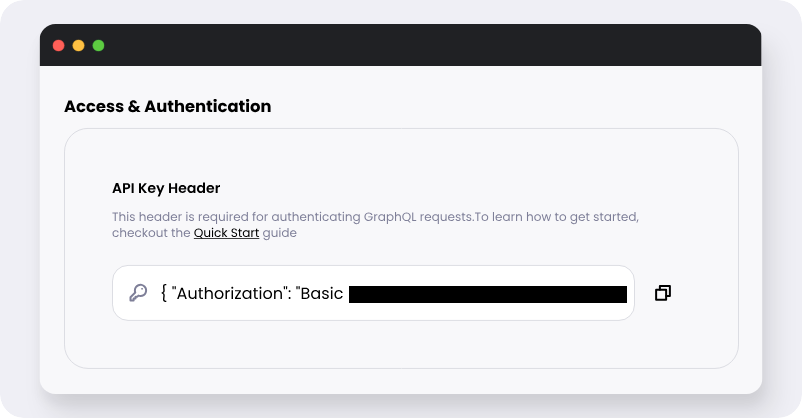 Grab the API header from console
Find out more about [authorizations](api-reference/authorization) needed to use Rye.
Rye APIs are exposed via [GraphQL](/get-started/intro-to-graphql). While it is possible to make requests to Rye using any HTTP client, we recommend using a dedicated GraphQL client library for ease of use. This tutorial will use the [`graphql-request`](https://www.npmjs.com/package/graphql-request) library as it is lightweight and easy to use. You can install it using any Node.js package manager:
```bash npm theme={null}
npm install graphql-request
```
```bash yarn theme={null}
yarn add graphql-request
```
```bash pnpm theme={null}
pnpm add graphql-request
```
Initialize a GraphQL client with [your API key](/authorization-headers) via the following recipe:
```javascript theme={null}
import { GraphQLClient, gql } from 'graphql-request';
const endpoint = 'https://staging.graphql.api.rye.com/v1/query';
const client = new GraphQLClient(endpoint)
const headers = {
'Authorization': 'Basic ',
'Rye-Shopper-IP': '127.0.0.1',
};
```
For a real integration, the `Rye-Shopper-IP` header should be set to the IP address of the shopper making the request. This is important for fraud detection and prevention.
Here is an example of fetching some products via GraphQL using the client we just set up.
```javascript Shopify theme={null}
async function fetchProduct() {
const query = gql`
query DemoShopifyProductFetch($input: ProductByIDInput!) {
product: productByID(input: $input) {
title
vendor
url
isAvailable
images {
url
}
price {
displayValue
}
... on ShopifyProduct {
productType
}
}
}
`;
const variables = {
input: {
id: '7074033139917',
marketplace: 'SHOPIFY',
},
};
const data = await client.request(query, variables, headers);
console.log(JSON.stringify(data, undefined, 2));
}
await fetchProduct();
```
```javascript Amazon theme={null}
async function fetchProduct() {
const query = gql`
query DemoAmazonProductFetch($input: ProductByIDInput!) {
product: productByID(input: $input) {
title
vendor
url
isAvailable
images {
url
}
price {
displayValue
}
... on AmazonProduct {
ASIN
}
}
}
`;
const variables = {
input: {
id: 'B09H6T8LTR',
marketplace: 'AMAZON',
},
};
const data = await client.request(query, variables, headers);
console.log(JSON.stringify(data, undefined, 2));
}
await fetchProduct();
```
Explore the entire API offering live on the [Rye Console](https://staging.console.rye.com/). Take a glance through the remaining docs to figure out how the Rye API can integrate into your app!
Grab the API header from console
Find out more about [authorizations](api-reference/authorization) needed to use Rye.
Rye APIs are exposed via [GraphQL](/get-started/intro-to-graphql). While it is possible to make requests to Rye using any HTTP client, we recommend using a dedicated GraphQL client library for ease of use. This tutorial will use the [`graphql-request`](https://www.npmjs.com/package/graphql-request) library as it is lightweight and easy to use. You can install it using any Node.js package manager:
```bash npm theme={null}
npm install graphql-request
```
```bash yarn theme={null}
yarn add graphql-request
```
```bash pnpm theme={null}
pnpm add graphql-request
```
Initialize a GraphQL client with [your API key](/authorization-headers) via the following recipe:
```javascript theme={null}
import { GraphQLClient, gql } from 'graphql-request';
const endpoint = 'https://staging.graphql.api.rye.com/v1/query';
const client = new GraphQLClient(endpoint)
const headers = {
'Authorization': 'Basic ',
'Rye-Shopper-IP': '127.0.0.1',
};
```
For a real integration, the `Rye-Shopper-IP` header should be set to the IP address of the shopper making the request. This is important for fraud detection and prevention.
Here is an example of fetching some products via GraphQL using the client we just set up.
```javascript Shopify theme={null}
async function fetchProduct() {
const query = gql`
query DemoShopifyProductFetch($input: ProductByIDInput!) {
product: productByID(input: $input) {
title
vendor
url
isAvailable
images {
url
}
price {
displayValue
}
... on ShopifyProduct {
productType
}
}
}
`;
const variables = {
input: {
id: '7074033139917',
marketplace: 'SHOPIFY',
},
};
const data = await client.request(query, variables, headers);
console.log(JSON.stringify(data, undefined, 2));
}
await fetchProduct();
```
```javascript Amazon theme={null}
async function fetchProduct() {
const query = gql`
query DemoAmazonProductFetch($input: ProductByIDInput!) {
product: productByID(input: $input) {
title
vendor
url
isAvailable
images {
url
}
price {
displayValue
}
... on AmazonProduct {
ASIN
}
}
}
`;
const variables = {
input: {
id: 'B09H6T8LTR',
marketplace: 'AMAZON',
},
};
const data = await client.request(query, variables, headers);
console.log(JSON.stringify(data, undefined, 2));
}
await fetchProduct();
```
Explore the entire API offering live on the [Rye Console](https://staging.console.rye.com/). Take a glance through the remaining docs to figure out how the Rye API can integrate into your app!