> ## Documentation Index
> Fetch the complete documentation index at: https://docs-test.rye.com/docs/llms.txt
> Use this file to discover all available pages before exploring further.
# Shopify App Installation Guide
**The Rye Shopify app currently only works in our Production environment.** Testing your integration with the Shopify app must be done from your Production account, against a store with [test payments enabled](/create-your-own-store).
In order for a Shopify merchant to be integrated, they are required to install the Rye Shopify app. Once integrated, developers can leverage the Rye API to access a range of functionalities within the merchant's store, such as managing inventory, processing orders, handling customer returns, etc.
## Rye App Installation
It is a more seamless experience to have Shopify merchants that you work with install the Rye App. This enables the following:
* Live product data updates (inventory, price, etc.)
* Native commission rates
1. Login to Shopify admin and select the store you want to install the Rye app on.
2. Go to the Rye app page [here](https://apps.shopify.com/rye).
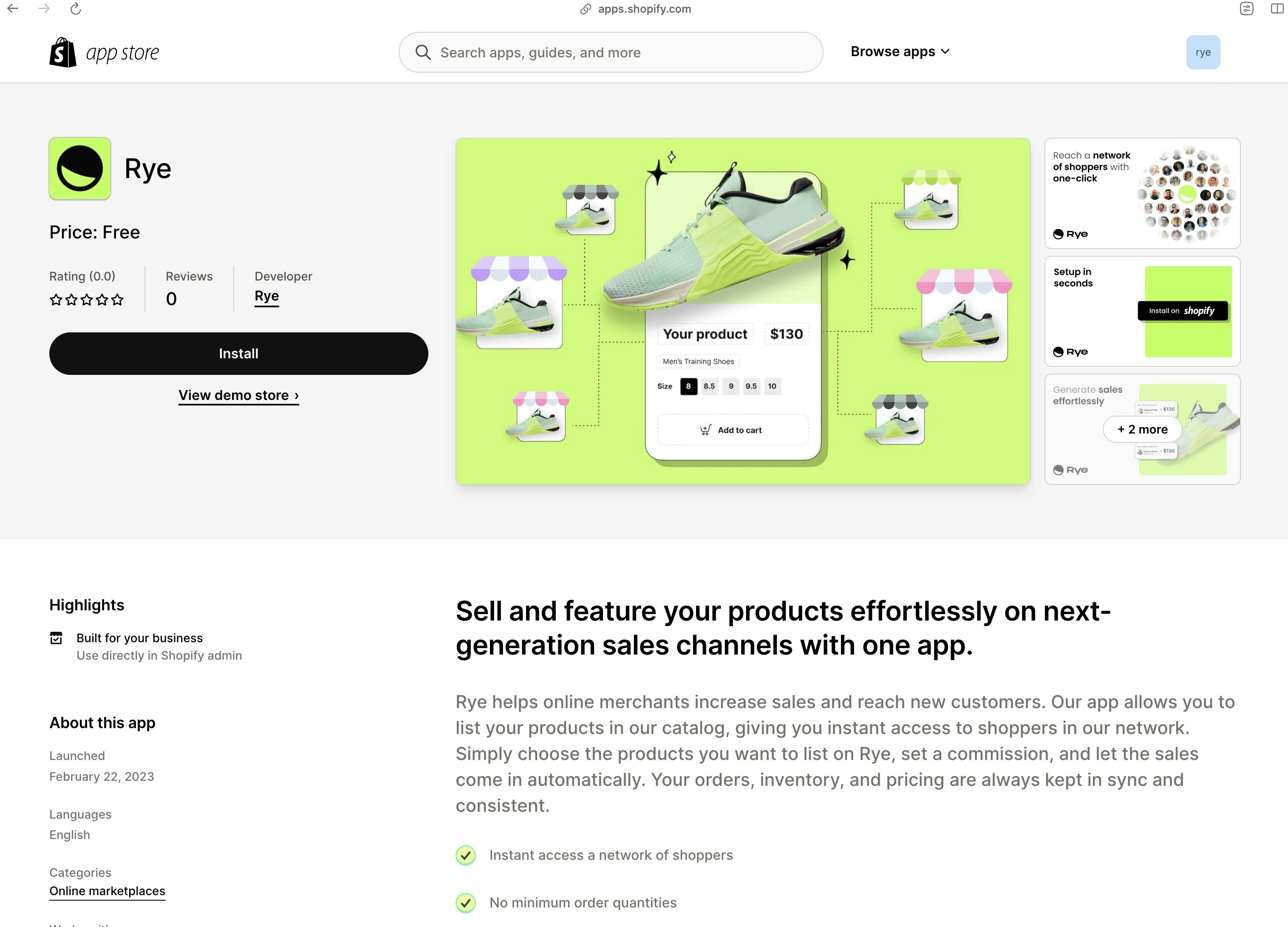 3. Click the install button which will redirect you to the app install page.
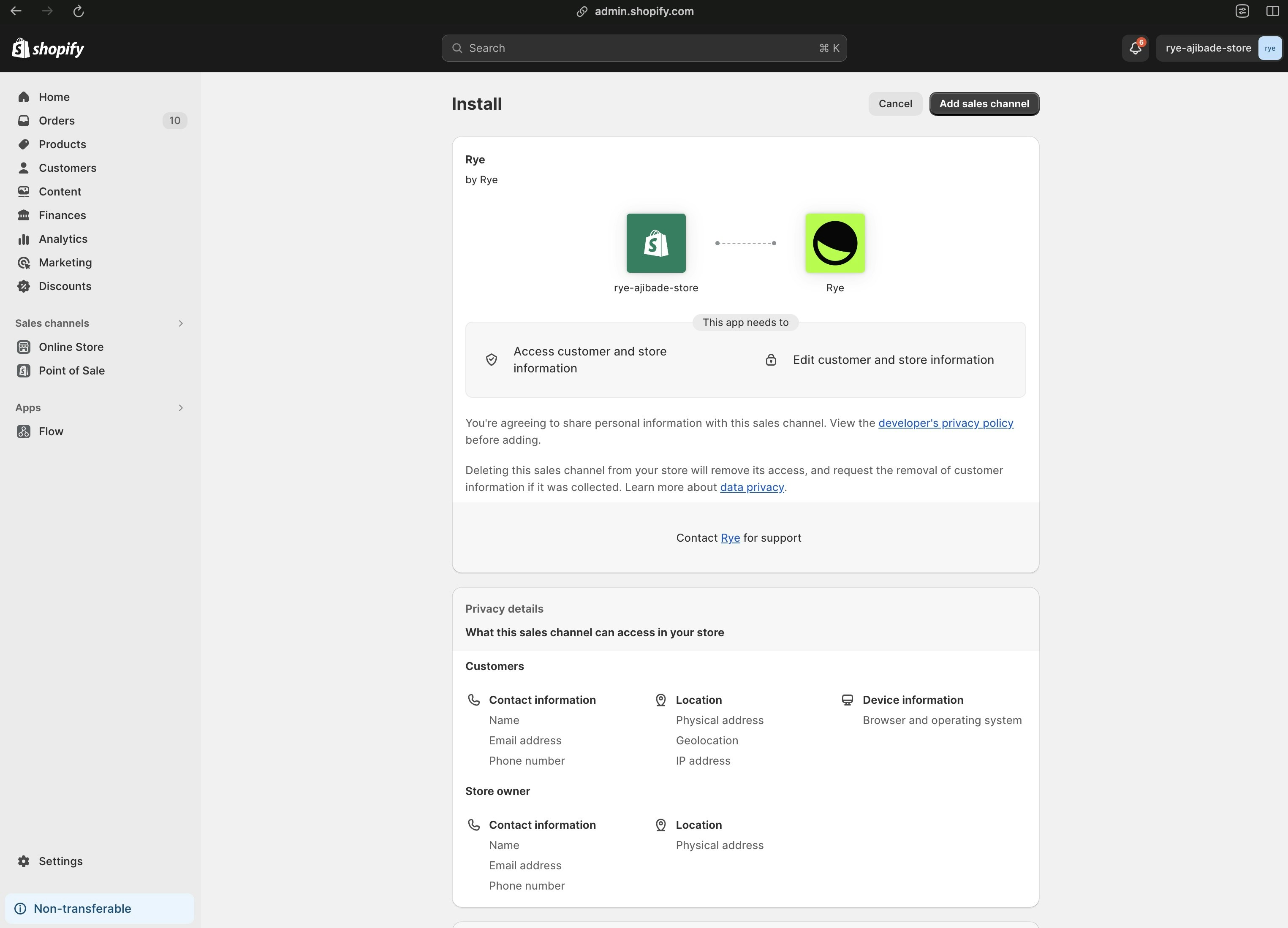 4. Click the `Add sales channel` button at the top right.
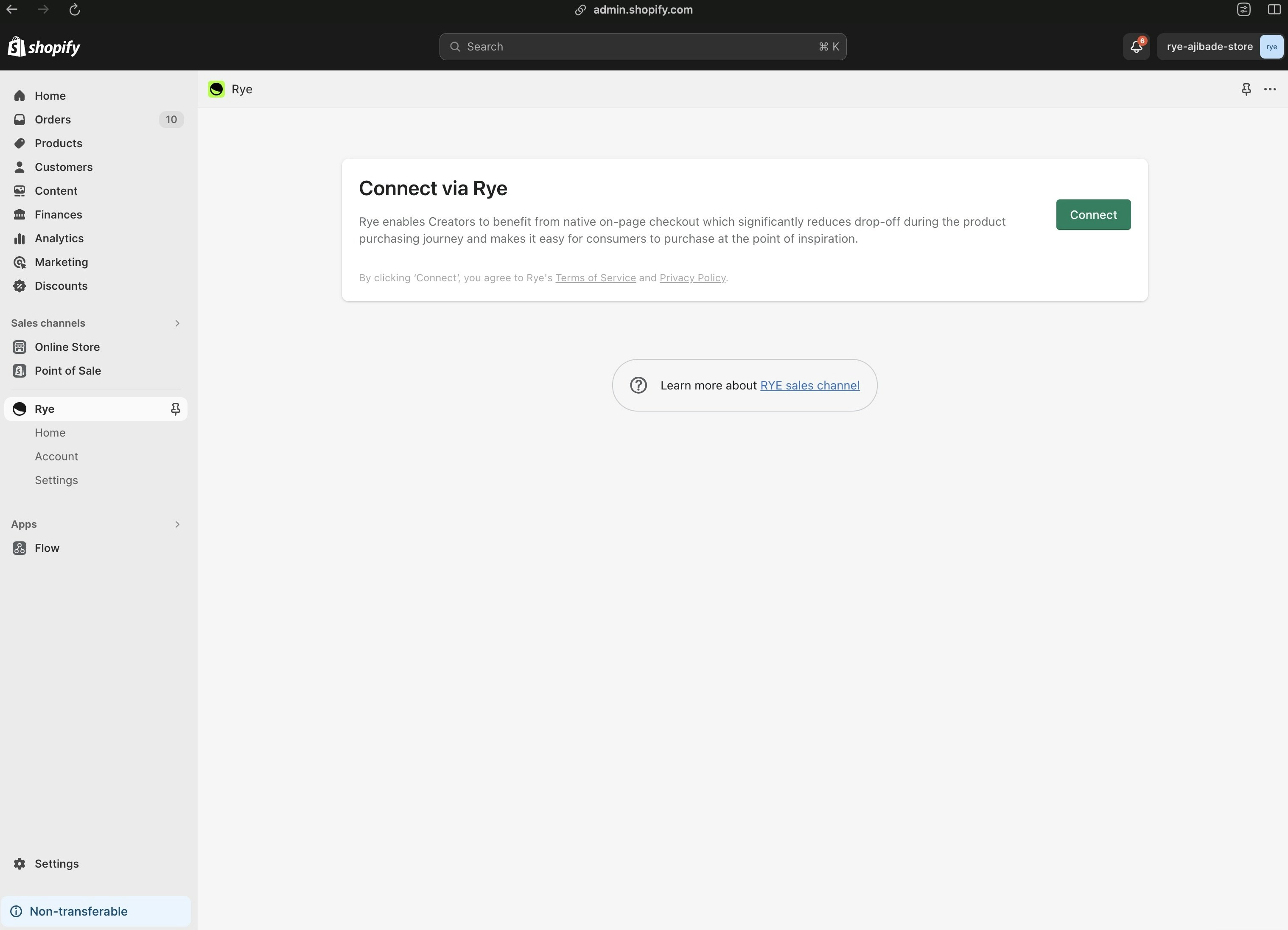
5. You should land on the `Connect via Rye` page. Click the `Connect` button.
4. Click the `Add sales channel` button at the top right.
5. You should land on the `Connect via Rye` page. Click the `Connect` button.
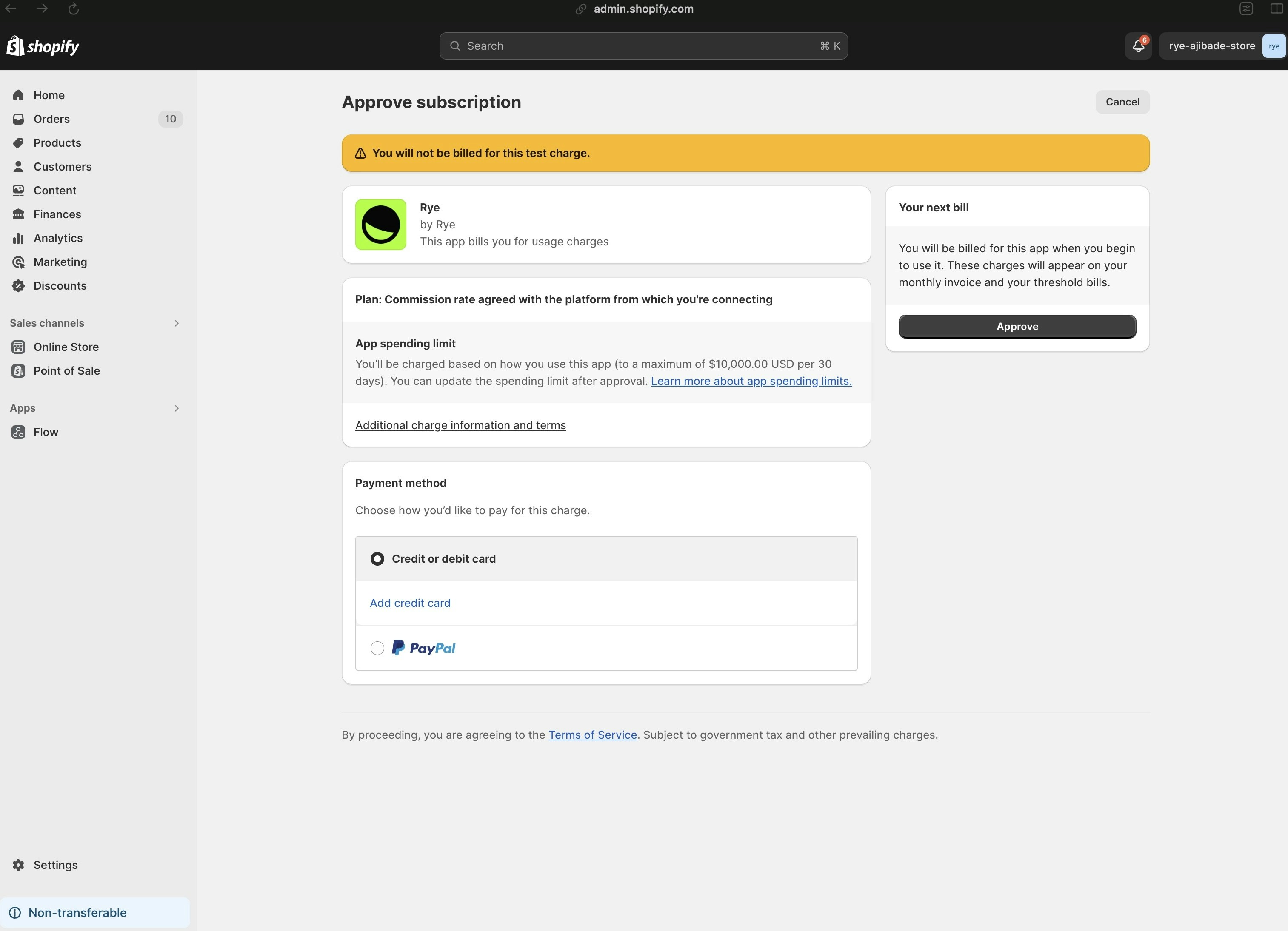
 6. After clicking `Connect`, you will be asked to approve the Rye subscription. Select your payment method and click approve.
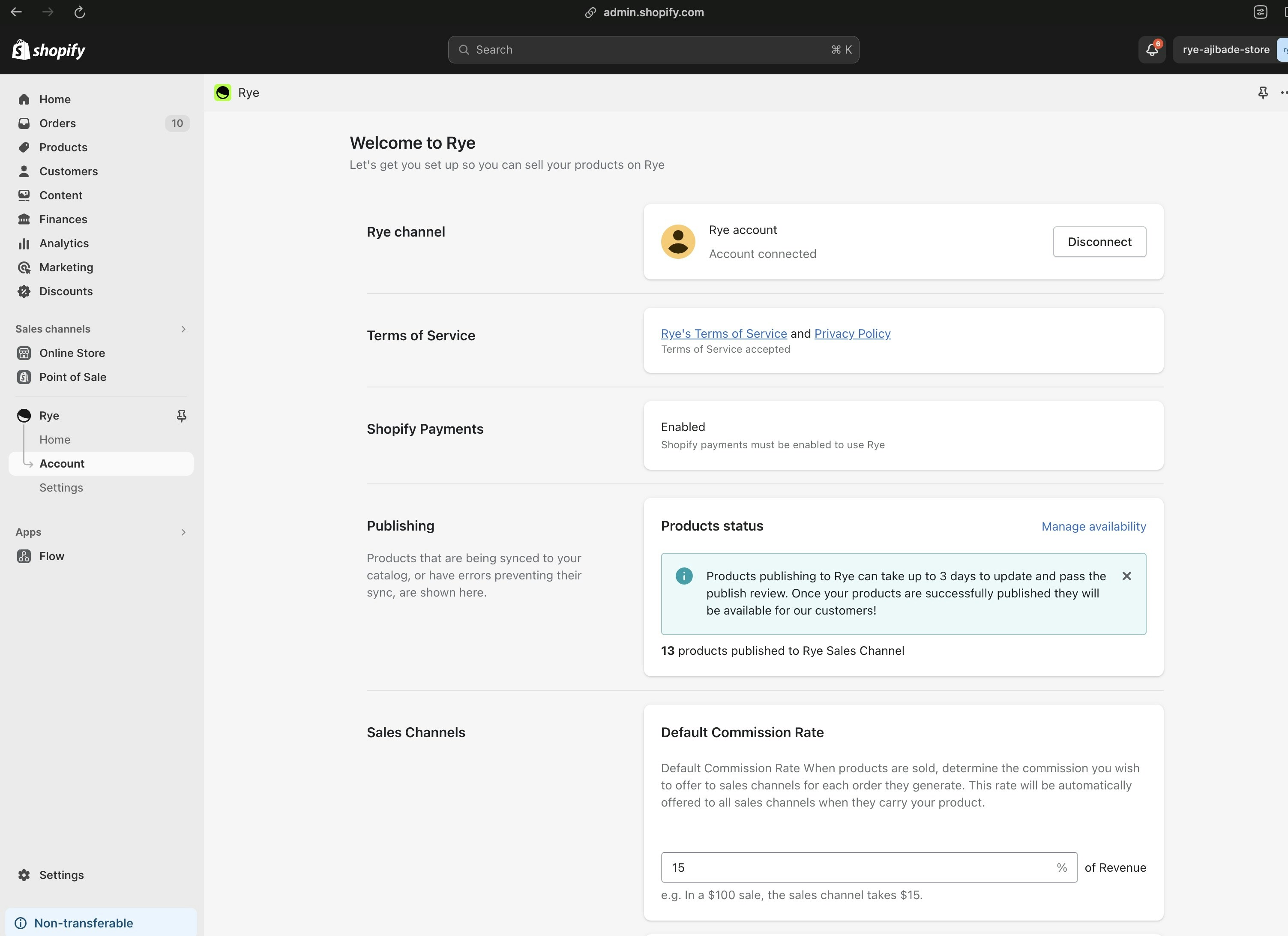
 7. After approving the subscription, you will be redirected to the Rye app dashboard. Here you can do things like update your commission rate.
 ## FAQ
#### How much does it cost to use Rye?
* Rye is free to download and install, and there are no monthly subscription fees (\$0).
* You only pay commissions on sales that are generated, and you are in full control of the commission rate you set. So if you set a 30% commission rate and generate \$100 in sales, you’ll pay \$30 to Rye (which we forward the majority of to sales channels) for that transaction. We only win if you win.
### Why does Rye require merchants to add a billing method and subscribe to it, even if the Rye app is free?
This is required by Shopify to charge commissions if one is set.
#### Can I adjust my commission rate?
* Yes. The commission rate is adjustable at any time within your Shopify Store, under:
* **Settings → Apps and Sales Channels → Rye → Open Sales Channel → Default Commission Rate**
#### What can I expect for sales and orders?
* The best way to think about Rye is as a passive sales channel: set and forget. Sales channels are marketing your product for you, and you reap the sales.
* We’ve had some brands generate 6 figures in 2 weeks, while others are generating a steady 4 figures a month.
* The best thing you can do to stimulate orders is: set an aggressive commission rate you’re comfortable with to incentivize the sales channels to market your products to their shoppers.
#### Can I choose which of my products is uploaded to Rye and sold on the various e-commerce channels?
* Yes. By default, all products are imported to Rye. You can adjust which products are uploaded at any time through your Shopify Application, however:
* **Settings → Apps and Sales Channels → Rye → Open Sales Channel → Publishing**
* New products created will have a checkbox to publish to sales apps like Rye.
#### What are some of the brands that Rye has helped generate sales for?
* We’ve helped hundreds of brands generate sales and revenue, some you may have heard of are:
* Alo Yoga
* Auri Nutrition
* Baboon to the Moon
* Beauty & the Broth
* COSRX
* Fashion Nova
* Felix Gray
* Kettle & Fire
* Kylie Cosmetics
* L’Oréal
* Lyfefuel
* Mojo
* Princess Polly
* Sol de Janeiro
#### What level of access does the Rye App have in the Shopify store?
* Visit the [Access Scopes](/sync-api/shopify-merchant-onboarding/shopify-app-access-scopes) page for details.
## Troubleshooting Tips:
#### 404 Page
Sometimes after clicking `Approve` on the app install page, you will be redirected to a 404 page. If this happens, follow the installation flow again and it should work.
## FAQ
#### How much does it cost to use Rye?
* Rye is free to download and install, and there are no monthly subscription fees (\$0).
* You only pay commissions on sales that are generated, and you are in full control of the commission rate you set. So if you set a 30% commission rate and generate \$100 in sales, you’ll pay \$30 to Rye (which we forward the majority of to sales channels) for that transaction. We only win if you win.
### Why does Rye require merchants to add a billing method and subscribe to it, even if the Rye app is free?
This is required by Shopify to charge commissions if one is set.
#### Can I adjust my commission rate?
* Yes. The commission rate is adjustable at any time within your Shopify Store, under:
* **Settings → Apps and Sales Channels → Rye → Open Sales Channel → Default Commission Rate**
#### What can I expect for sales and orders?
* The best way to think about Rye is as a passive sales channel: set and forget. Sales channels are marketing your product for you, and you reap the sales.
* We’ve had some brands generate 6 figures in 2 weeks, while others are generating a steady 4 figures a month.
* The best thing you can do to stimulate orders is: set an aggressive commission rate you’re comfortable with to incentivize the sales channels to market your products to their shoppers.
#### Can I choose which of my products is uploaded to Rye and sold on the various e-commerce channels?
* Yes. By default, all products are imported to Rye. You can adjust which products are uploaded at any time through your Shopify Application, however:
* **Settings → Apps and Sales Channels → Rye → Open Sales Channel → Publishing**
* New products created will have a checkbox to publish to sales apps like Rye.
#### What are some of the brands that Rye has helped generate sales for?
* We’ve helped hundreds of brands generate sales and revenue, some you may have heard of are:
* Alo Yoga
* Auri Nutrition
* Baboon to the Moon
* Beauty & the Broth
* COSRX
* Fashion Nova
* Felix Gray
* Kettle & Fire
* Kylie Cosmetics
* L’Oréal
* Lyfefuel
* Mojo
* Princess Polly
* Sol de Janeiro
#### What level of access does the Rye App have in the Shopify store?
* Visit the [Access Scopes](/sync-api/shopify-merchant-onboarding/shopify-app-access-scopes) page for details.
## Troubleshooting Tips:
#### 404 Page
Sometimes after clicking `Approve` on the app install page, you will be redirected to a 404 page. If this happens, follow the installation flow again and it should work.